

UGC ads outperform polished brand creative in direct response — consistently. The problem has always been sourcing: coordinating real creators takes days, costs money, and still gives you maybe 5 clips to test.
HiggsField generates video from text prompts. It now works directly inside Claude Code via CLI. So you write a brief, Claude Code generates 20 clips, saves them to a folder, and you pick what to post.
A full month of content in one session. Here's how to set it up.
What HiggsField actually produces
HiggsField is a video generation model built for realistic footage. The output looks like something filmed on a phone: handheld feel, natural lighting, slightly imperfect edges. That's exactly what UGC ads need.
It's not cinematic. It's not polished. That's the point. Audiences scroll past obviously branded content. They stop for things that look like a real person posted them.
HiggsField covers video generation, image generation, and character tools. For UGC, you're using the video side. The free tier has rate limits — for batching 20+ clips, get on the paid plan before you start.
How to connect HiggsField to Claude Code
HiggsField officially recommends the CLI method for Claude Code. Three commands and you're connected:
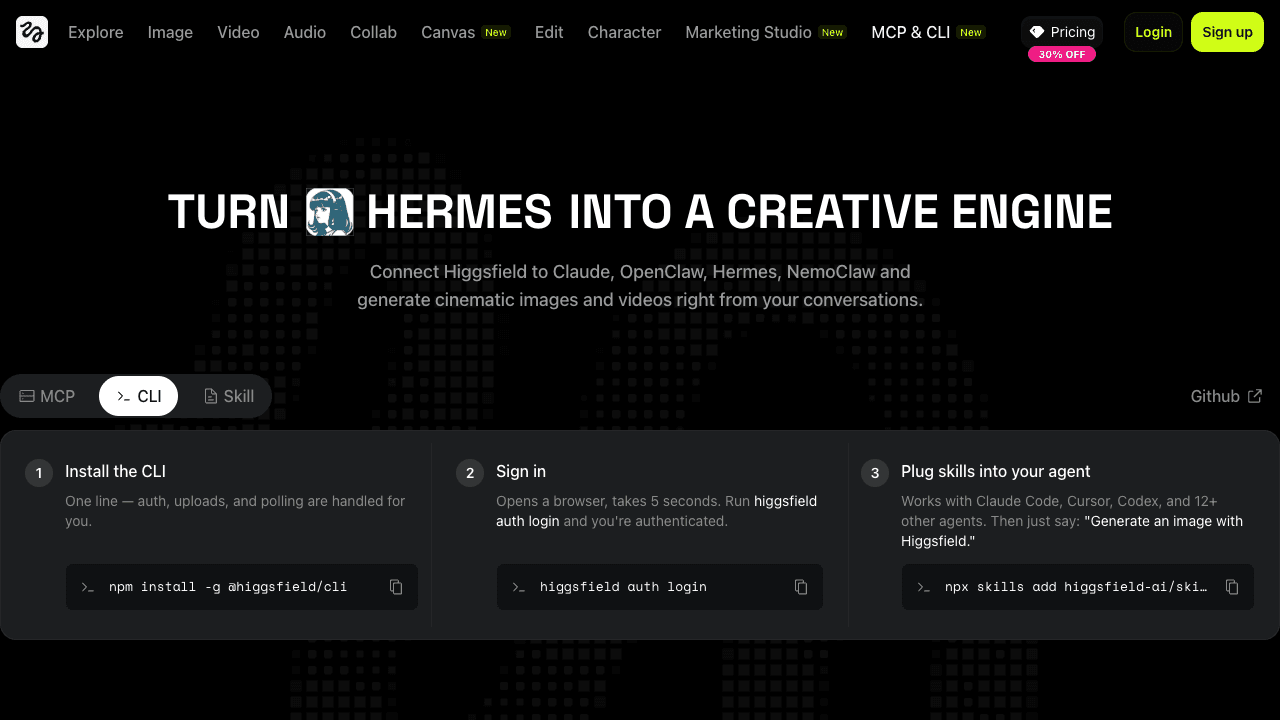
Step 1 — Install the CLI:
npm install -g @higgsfield/cliStep 2 — Authenticate:
higgsfield auth loginThis opens a browser tab. Sign in with your HiggsField account. Takes about 5 seconds.
Step 3 — Add the skill to Claude Code:
npx skills add higgsfield-ai/skillsRestart Claude Code. HiggsField's tools are now available in your session. To confirm, ask Claude Code to list its available tools — HiggsField should appear.
Prompts that generate usable UGC footage
The model responds to physical specifics — what someone is doing with their hands, where they're looking, what's literally in frame. Describing feelings or vibes produces bad footage.
Works:
6-second clip. A woman in her 30s holds a small coffee
mug with both hands, takes a sip, smiles slightly at
the camera. Kitchen background, morning light,
handheld phone feel.
Doesn't work:
A happy person enjoying their morning coffee.The difference is observable action vs. abstract feeling. Describe what's happening physically, not emotionally.
For product shots, name the object precisely. “Small amber glass bottle with a black dropper cap” generates something usable. “A skincare product” doesn't.
Keep subjects at mid-distance. Close-up face shots are the model's weakest output — faces look slightly off at tight angles. Let the action carry the clip, not the expression.
Generating a month of content in one session
Write a system prompt once and Claude Code runs the full batch — writing prompts, calling HiggsField, saving files, logging every clip.
You have access to HiggsField video generation tools.

Create 20 UGC-style videos for [product/brand].

Product: [describe in physical detail — materials,
         size, color, how it's held or used]
Style: handheld phone camera, natural light, real-looking people
Duration: 6-8 seconds each
Tone: everyday, casual

For each clip:
1. Write a prompt describing observable physical action
2. Generate via HiggsField
3. Save to /output/clip-[number].mp4
4. Log the prompt used

Start with clip 01.
Claude Code loops through all 20, logs each prompt, and flags anything that fails. You come back to a folder of raw clips and pick what to post.
Budget about 1 in 5 clips needing a regen. Artifacts happen, especially on borderline prompts. That's normal — the output rate is still far better than sourcing creators manually.
What to do with the raw clips
Each clip needs about 3-5 minutes of editing. CapCut handles it. Add a hook frame, text overlay with the product name, and a CTA at the end.
Don't add stabilization, color grading, or any production polish to the footage itself. The slightly imperfect, phone-filmed look is what makes it work. Clean it up and it looks like an ad — which is exactly what you don't want.
If an edit is taking more than 5 minutes, the clip isn't usable. Regen it with a tighter prompt.
Real limitations to know before you start
You still need to review every clip. The workflow isn't fully autonomous yet. And for anything requiring a specific branded product in-hand — exact label colors, specific packaging — results are inconsistent. The model works well with product categories, not with branded specifics.
Strongest output: lifestyle footage, relatable environments, people using a type of product. Weakest output: close-up faces, exact brand details, anything requiring precise text on-screen.
Compared to coordinating real UGC creators: roughly 80% less time, zero back-and-forth, clips ready in minutes. For testing which angles convert before paying for proper production, this is the fastest way to find out.
Want this set up for your business? I build custom AI automation systems — including content pipelines like this — for small businesses. Start with a free 30-min strategy call.
Trilochan Bhalla
AI automation consultant for small businesses. I build custom systems that save time, capture more leads, and keep businesses running without the owner having to be everywhere at once.
Book a free strategy call →